Turn One XML Feed into Multiple Marketplace Feeds
Stop rebuilding your product feed for every marketplace. Connect one XML source and publish synced, correctly-formatted feeds for Skroutz, BestPrice, Google Shopping and more - no coding required.
Create 9€ WorkspaceHow to Sync One XML Feed to Multiple Marketplaces with NodeXML
- Paste your source XML feed URL or upload your file into NodeXML.
- Choose the marketplaces you want to publish to — Skroutz, BestPrice, Google Shopping, and others.
- NodeXML auto-maps your XML fields to each marketplace’s required tags (price, availability, brand, EAN, etc.).
- Set channel-specific rules — price markups, excluded categories, or field overrides — per marketplace.
- Save your workspace to get a permanent, auto-synced feed URL for each channel.
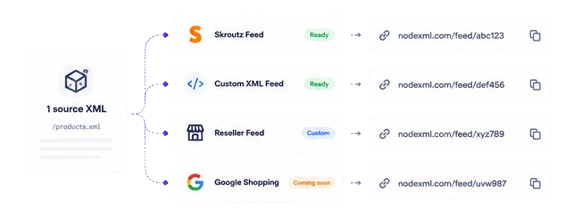
Every marketplace expects its own tag names and structure. Skroutz wants different fields than Google Shopping, which wants different fields than BestPrice. Instead of maintaining three separate exports (or three separate plugins), NodeXML keeps one source feed and generates the rest automatically, refreshed on your schedule.
Why Sellers Use NodeXML for Multi-Marketplace Feeds
- Connect a single XML feed and generate correctly-formatted outputs for every marketplace you sell on.
- NodeXML suggests the right mapping for each marketplace template and flags missing required fields.
- Apply different price rules, filters, or overrides to each marketplace without touching your source feed.
- Feeds refresh automatically (every 30 min / 6h / 24h) so listings never go stale or get flagged for inaccurate stock.
Frequently Asked Questions
Q: Can I use the same feed for Skroutz and Google Shopping?
A: Yes. Upload one source feed and NodeXML generates a separately formatted, marketplace-compliant output for each channel — no need to maintain multiple files.
Q: Do I need a plugin for my store platform?
A: No. NodeXML works with any XML feed regardless of which platform generated it — WooCommerce, Shopify, PrestaShop, or a custom export.
Q: How often do the feeds update?
A: On the free plan, your edited feed stays live for 24 hours. Paid workspaces support auto-sync every 30 minutes, 6 hours, or 24 hours.